Tutorial#
[1]:
import graphviz

import pybliss as bliss
bliss.Graph: Undirected graph type#
We can create a bliss.Graph in two ways:
Manually using
Graph.add_vertices,Graph.add_edgeUsing
Graph.from_dimacs
[2]:
# Make a pentagon graph with add_edge
pentagon = bliss.Graph(5)
for i in range(5):
    pentagon.add_edge(i, (i + 1) % 5)

# Print the dot code to check
print(pentagon.to_dot())
graph g {
v0 [label="0:0"];
v0 -- v1
v0 -- v4
v1 [label="1:0"];
v1 -- v2
v2 [label="2:0"];
v2 -- v3
v3 [label="3:0"];
v3 -- v4
v4 [label="4:0"];
}
[3]:
with open("pentagram.txt", "w") as fp:
    fp.write("""p edge 5 5
n 1 0
n 2 0
n 3 0
n 4 0
n 5 0
e 1 3
e 1 4
e 2 4
e 2 5
e 3 5""")
with open("pentagram.txt") as fp:
    # Make a pentagram from DIMACS
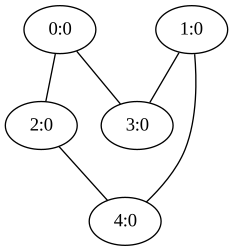
    pentagram = bliss.Graph.from_dimacs(fp)

graphviz.Source(pentagram.to_dot())
[3]:
[4]:
# Check if pentagon and pentagon are identical
pentagon == pentagram
[4]:
False
Canonicalization#
Use
Graph.get_permutation_to_canonical_formto get permutation needed to obtain the canonical form of the graph.Use
Graph.permuteto permute the graph using the obtain the cannonical graph.
[5]:
# Get permutations for canonical form
s1 = bliss.Stats()
s2 = bliss.Stats()
pentagon_perm = pentagon.get_permutation_to_canonical_form(s1)
pentagram_perm = pentagram.get_permutation_to_canonical_form(s2)
print("pentagon_perm =", pentagon_perm)
print("pentagram_perm =", pentagram_perm)
pentagon_perm = [4 3 1 0 2]
pentagram_perm = [4 1 2 3 0]
[6]:
# Get the canonical form of each and check for identity
pentagon_canon = pentagon.permute(pentagon_perm)
pentagram_canon = pentagram.permute(pentagram_perm)
print("Canon(pentagon) ?= Canon(pentagram):", pentagon_canon == pentagram_canon)
Canon(pentagon) ?= Canon(pentagram): True
Finding \(\mathrm{Aut}(G)\)#
[7]:
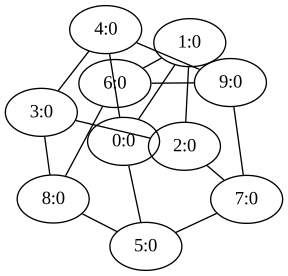
# Let's explore the automorphisms of the petersen graph
petersen = bliss.Graph(10)

for i in range(5):
    # Outer 5-cycle (0-1-2-3-4-0)
    petersen.add_edge(i, (i + 1) % 5)

    # Inner star-shaped connections (5-7-9-6-8-5)
    petersen.add_edge(i + 5, ((i + 2) % 5) + 5)

    # Connections between outer and inner nodes (0-5, 1-6, 2-7, 3-8, 4-9)
    petersen.add_edge(i, i + 5)

graphviz.Source(petersen.to_dot(), engine="neato")
[7]:
Graph.find_automorphisms#
bliss.Graph.find_automorphisms reports all the automorphisms that were found via a callback function which is called each time a new generator for the automorphism group is found. The first argument for the callback n for the function is the length of the automorphism, and the second argument is the automorphism which comes in as a Numpy array.
[8]:
def report(n, aut):
    print(f"Found a new automorphism generator of length {n}, aut = {aut}.")


s = bliss.Stats()
petersen.find_automorphisms(s, report)

print(f"Reported stats:\n{s}")
Found a new automorphism generator of length 10, aut = [0 1 2 7 5 4 6 3 9 8].
Found a new automorphism generator of length 10, aut = [0 4 3 8 5 1 9 2 6 7].
Found a new automorphism generator of length 10, aut = [1 2 3 8 6 0 7 4 5 9].
Reported stats:
Nodes:          10
Leaf nodes:     5
Bad nodes:      0
Canrep updates: 1
Generators:     3
Max level:      3
|Aut|:          120
Adding resource constraints to Graph.find_automorphisms#
find_automorphisms accepts a callback which can instruction the traversal to terminate early.
[9]:
def report(n, aut):
    print(f"Found a new automorphism generator of length {n}, aut = {aut}.")


isearch = 0


def terminate():
    global isearch
    if isearch < 10:
        print(f"{isearch=}. Decided not to terminate")
        isearch += 1
        return False
    else:
        print("--->Terminating early<---")
        return True


s = bliss.Stats()
petersen.find_automorphisms(s, report, terminate)

print(f"Reported stats:\n{s}")
isearch=0. Decided not to terminate
isearch=1. Decided not to terminate
isearch=2. Decided not to terminate
isearch=3. Decided not to terminate
Found a new automorphism generator of length 10, aut = [0 1 2 7 5 4 6 3 9 8].
isearch=4. Decided not to terminate
isearch=5. Decided not to terminate
isearch=6. Decided not to terminate
isearch=7. Decided not to terminate
Found a new automorphism generator of length 10, aut = [0 4 3 8 5 1 9 2 6 7].
isearch=8. Decided not to terminate
isearch=9. Decided not to terminate
--->Terminating early<---
Reported stats:
Nodes:          7
Leaf nodes:     4
Bad nodes:      0
Canrep updates: 1
Generators:     2
Max level:      3
|Aut|:          12
Coloring a graph#
Recall that bliss always provides operations on colored graphs i.e. graphs of the form \((V, E, C)\).
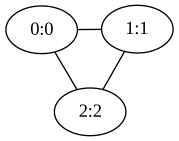
By default all vertices have color=0. Call Graph.change_color to set the color of a vertex.
[10]:
k3 = bliss.Graph(3)
for i in range(3):
    k3.add_edge(i, (i + 1) % 3)
    # set the color of each i-vertex as i.
    k3.change_color(i, i)

# Check the graph has colored vertices.
graphviz.Source(k3.to_dot(), engine="neato")
[10]:
Visualization#
Print the graph in DIMACS format using
Graph.to_dimacs.Write the graph in DIMACS format using
Graph.write_dimacs.Similarly,
to_dot,write_dotare provided.
[11]:
print(petersen.to_dimacs())
p edge 10 15
n 1 0
n 2 0
n 3 0
n 4 0
n 5 0
n 6 0
n 7 0
n 8 0
n 9 0
n 10 0
e 1 2
e 1 5
e 1 6
e 2 3
e 2 7
e 3 4
e 3 8
e 4 5
e 4 9
e 5 10
e 6 8
e 6 9
e 7 9
e 7 10
e 8 10
[12]:
with open("petersen.txt", "w") as fp:
    petersen.write_dimacs(fp)

# Check the contents of written file
with open("petersen.txt") as fp:
    print(fp.read())
p edge 10 15
n 1 0
n 2 0
n 3 0
n 4 0
n 5 0
n 6 0
n 7 0
n 8 0
n 9 0
n 10 0
e 1 2
e 1 5
e 1 6
e 2 3
e 2 7
e 3 4
e 3 8
e 4 5
e 4 9
e 5 10
e 6 8
e 6 9
e 7 9
e 7 10
e 8 10
bliss.Digraph: Directed graphs#
All the operations described on bliss.Graph hold, except the graph is now directed.
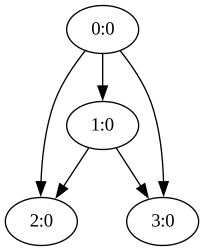
In a similar fashion to bliss.Graph. we can instantiate a directed graph as follows:
[13]:
g = bliss.Digraph(4)

g.add_edge(0, 1)
g.add_edge(0, 2)
g.add_edge(0, 3)
g.add_edge(1, 2)
g.add_edge(1, 3)

graphviz.Source(g.to_dot())
[13]: